Learn
Azure AI Foundry model lifecycle, explained
Last reviewed:
Five statuses. One Broadway analogy. Microsoft already chose the theatre vocabulary — they called it Preview for a reason.
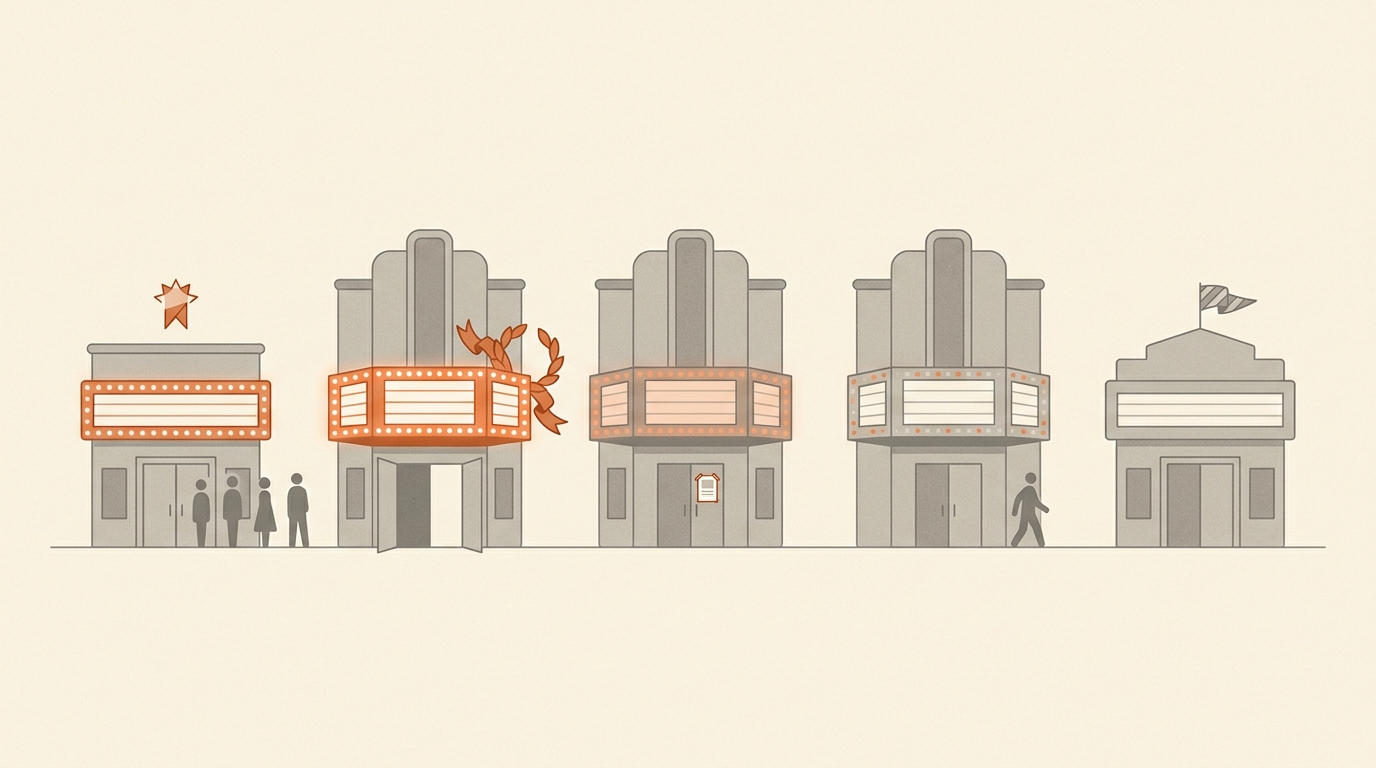
1. The big picture — five statuses, one timeline
Every model in the Foundry catalogue lives on a single one-way arrow that runs from Preview (or straight into GA) through Generally Available, then through Retiring and Deprecated until the model is pulled. Unknown is the off-Broadway exception — same theatre, different producer, different rules.
Two axes drive every timing decision: how much notice you get before something changes, and whether existing deployments keep working through the change. Both are baked into Microsoft's published commitments; both are what your migration plan is being measured against.
| Status | ARM enum | Existing deployments | New deployments | Notice you get |
|---|---|---|---|---|
| Preview | Preview | Auto-upgraded by Microsoft | Allowed (eval only) | ~30 days before upgrade |
| GA | GenerallyAvailable | Run uninterrupted | Allowed | ≥ 60 days before retirement; ≥ 12 months availability floor |
| Retiring | Deprecating | Run until retirement date | Blocked for first-time customers | Already given; retirement date is fixed |
| Deprecated | Deprecated | Final stretch — error after retirement date | Blocked | No further notice; emergency retirements possible |
| Unknown | (field omitted) | Per publisher | Per publisher | Per publisher |
2. The Broadway analogy
Picture the Foundry catalogue as a row of theatres on Broadway. Microsoft owns the buildings, books the lighting and stage crew, runs the box office. The shows themselves — the actual models — come from production companies. Some are Microsoft's own (the in-house OpenAI productions); many are partners (Mistral, Cohere, Meta, the wider Foundry Models catalogue).
Now picture how a Broadway show's life actually goes:
- Previews — the show plays for paying audiences before opening night. Performances are real, but the script is still being rewritten between shows; songs get cut; the running time shifts. Critics aren't reviewing yet. The run is short, and management can pull the show with little notice.
- Opening night and the regular run — the script locks, reviews come out, the show settles into its run. Now there's a long-term commitment to the audience: a guaranteed minimum number of weeks, advance notice for any schedule change.
- Closing notice posted — management posts a closing date on the marquee. Existing ticket-holders still see the show; the box office stops selling new subscription packages to first-time customers. Plenty of time to plan a different night out.
- Final week — the closing date is confirmed; the marquee starts coming down. The last performances play, then the theatre goes dark.
- Touring company / off-Broadway / guest production — a different producer's show running in a Microsoft-owned theatre. Microsoft handles the venue; the producer sets everything else — reviews, refunds, schedule, closing terms.
The mapping into Foundry is direct. Preview = previews. GA = the regular run. Retiring = closing notice. Deprecated = final week. Unknown = touring production. The fact that Microsoft uses Preview — not "beta", not "alpha", not "experimental" — is the giveaway. It's the same industry term, with the same connotations: real audiences, unfinished script, short run, light obligations.
3. The five statuses, one by one
Each card below names the analogy first, then the operational facts. ARM enum values come from
the Microsoft.CognitiveServices/locations/{location}/models response;
semantic definitions come from the
Foundry model-retirements docs.
Preview
Preview Analogy — preview performances, before opening night. Real audiences, real shows, but the script is still being rewritten between performances. Run is short; management can pull the show with little warning.
- What it means
- Released for evaluation. Microsoft explicitly does not recommend Preview models for production. The model can change between deployments — context window, output format, even capabilities — and there is no GA SLA.
- Lifespan
- Typically 90–120 days. Then either promoted to GA or replaced by a newer Preview version.
- Notice window
- At least 30 days before Microsoft auto-upgrades existing Preview deployments to a newer Preview or to a GA version. No 12-month availability floor.
- Pricing & SLA
- Provisional pricing — may change at GA. No latency SLA, no availability SLA. Some Preview models are listed at a temporary off-peak discount; others are GA-priced from day one.
- What to do
- Use it for prototypes, evaluation, and benchmarking. Do not pin a production application to a Preview model. Watch the Foundry retirement page weekly while it's anywhere in your stack.
Generally Available
GenerallyAvailable Analogy — opening night has happened, reviews are out, the show is in its run. The script is locked; the season is announced; the box office sells advance tickets with confidence.
- What it means
- Production-ready. Covered by Azure SLAs (latency for Provisioned, throughput for Standard) and supported by Microsoft customer support. Stable retail pricing.
- Availability commitment
- At least 12 months from the GA date. This is a floor, not a ceiling — most GA models stay deployable for considerably longer.
- Notice window
- At least 60 days' notice before retirement, except in the case of "emergency retirements" (see §6).
- Pricing & SLA
- Stable prices in the Azure pricing pages and the Retail Prices API; latency SLA on Provisioned tiers; throughput / availability SLAs on Standard.
- What to do
- Default choice for new production workloads. When you see GA, you can safely build a roadmap measured in quarters, not weeks.
Retiring
Deprecating Analogy — closing notice posted at the box office. The marquee announces the closing date. Existing ticket-holders still attend; new subscription packages aren't being sold to first-time customers.
- What it means
- A retirement date has been announced and the deprecation window is open. Existing deployments continue to function; the model is removed from new-deployment workflows.
- Important nuance
- Customers who already deployed the model before the deprecation announcement can typically still create new deployments of it through the deprecation date. First-time customers cannot create any deployment.
- Notice window
- Already given. The deprecation announcement is itself the start of the notice clock; the retirement date is a hard end.
- Naming gotcha
- The ARM enum is
Deprecating; Microsoft Learn calls this same phase Retiring. Foundry Map normalises to Retiring. - What to do
- Plan the migration. Read the deprecation announcement — it usually names the successor model. Benchmark prompts on the successor in non-prod before flipping production.

Deprecated
Deprecated Analogy — final week. The closing date has been confirmed; the marquee starts coming down; the last performances play to holdover audiences.
- What it means
- Past the deprecation date and on the runway to retirement. No new deployments are allowed at all. Existing deployments may continue until the published retirement date, after which Foundry returns error responses for inference requests.
- Notice window
- No further notice is given inside the Deprecated window — whatever was published when the model entered Retiring is the only timeline you get.
- Emergency retirement
- Microsoft reserves the right to issue emergency retirements for security or compliance reasons, bypassing the standard notice timeline.
- What to do
- If a workload is still pinned here, treat it as a P1. The retirement date is a hard SLA cliff: requests start failing the day after.

Unknown
(field omitted) Analogy — touring company / off-Broadway. A different producer's show running in a Microsoft-owned theatre. Microsoft handles the venue; the producer sets the terms.
- What it means
- Not a Microsoft enum value. Foundry Map adds this label when ARM returns no
lifecycle_statusfield for a model — almost always a Foundry Models partner offering (Mistral, Cohere, Meta, AI21, Marketplace listings, community models) where the publisher controls lifecycle, support, and billing. - Notice window
- Per publisher. The Azure-published 60-day GA notice does not automatically apply to partner models — read the publisher's terms.
- SLA
- Don't assume Azure SLA coverage. Some partner models inherit Microsoft's hosting SLA but not its model-availability SLA; others are entirely publisher-governed.
- What to do
- Treat Unknown as "GA-ish, but check the publisher". For partner models, look for a publisher-side EOL policy and a model card on Foundry with versioning conventions before pinning production to it.
4. The notice windows that matter
Three numbers do most of the work when you're planning around model lifecycle:
12 mo
Minimum GA availability
After a model goes GA, Microsoft commits to keeping it deployable for at least 12 months. Plan a refresh cadence around that floor, not the ceiling.
60 days
GA retirement notice
Minimum heads-up before a GA model is retired. The clock starts the day Microsoft publishes the retirement date, not the day the model enters Deprecated.
30 days
Preview upgrade notice
Minimum heads-up before Microsoft auto-upgrades an existing Preview deployment to a newer Preview version or to GA.
5. What to do when you see each status
Should I deploy a Preview model in production?
No. The 30-day auto-upgrade clock is the giveaway: Preview deployments will be replaced underneath you on Microsoft's schedule, not yours, and the replacement is allowed to change behaviour. Build against Preview to evaluate; promote to a GA model before going live.
Got a Retiring notice — what's the playbook?
- Read the deprecation announcement — it usually names the successor model Microsoft expects you to move to.
- Benchmark your prompts on the successor in a non-production deployment. Outputs are not byte-identical between model versions; eval suites catch silent regressions.
- Migrate before the deprecation date if possible. After deprecation, no new deployments can be created — if your production region or scope can't host the successor, you'll find out at the worst time.
- Pull the failing-request error path through tabletop before the retirement date. Treat the retirement date as a hard SLA cliff.
Status is Unknown — how do I evaluate?
Treat Unknown as "GA-ish, but check the publisher". Foundry Models from partners are stable enough to build on — Microsoft is not putting unstable third-party offerings on the same shelf as GA OpenAI models — but the lifecycle promises come from the partner, not Microsoft. Look for a publisher-side EOL policy and a model card on Foundry with versioning conventions before pinning production to it.
When should I start a migration?
The moment a successor goes GA, not the moment your current model goes Retiring. The closing-notice window is the floor of safety, not the design margin. Teams that wait until Retiring to start the migration tend to discover regional capacity issues, prompt regressions, or downstream caller incompatibilities at the worst possible time.
6. Caveats and edge cases
- Skip-Retiring direct retirement. Not every model passes through Retiring before Deprecated — some are pulled directly. Most often this happens to Preview-only models that never promote to GA, but emergency retirements can route GA models the same way. Don't rely on Retiring as a guaranteed waypoint.
- The naming inconsistency. The ARM REST schema enum is
Deprecating; Microsoft Learn docs and the Foundry portal call this phase Retiring or Deprecation. Same phase. Foundry Map normalises to Retiring because it matches the Foundry portal model card. - Per-SKU vs per-model lifecycle. Lifecycle status is reported per (model, version, SKU) tuple — a Standard deployment of a model can be Retiring while a Provisioned deployment of the same model is still GA. Foundry Map's per-model view shows the worst-case status across SKUs; the per-region table breaks it down per SKU.
- Auto-upgrade for Preview. Preview deployments are upgraded in-place by Microsoft. The 30-day notice covers the upgrade event itself; it does not promise the upgraded model accepts your existing prompts unchanged. Treat Preview deployments as if Microsoft can hot-patch them on a schedule.
- Partner / Marketplace models. When a publisher pulls a partner model from Foundry, Microsoft typically gives less notice than the Azure-published windows. Watch the Foundry Models page or your Marketplace subscription, not just the standard retirements page.
- Emergency retirements. Reserved for security, compliance, or legal events. Bypass the 60-day window. Rare, but they have happened — usually to Preview models with downstream regulatory issues.
7. Cheat sheet
| Status | Theatre | Production fit | Notice you'll get |
|---|---|---|---|
| Preview | Preview performances | Evaluation only | ~30 days before auto-upgrade |
| GA | The regular run | Default for prod | ≥ 60 days; 12-mo availability floor |
| Retiring | Closing notice posted | Migrate now | Already given; retirement date is hard |
| Deprecated | Final week | P1 incident | None — emergency retirements possible |
| Unknown | Touring production | Read publisher terms | Per publisher |
Sources
Drawn from Microsoft's public documentation. Last cross-checked against the live pages on the ; Microsoft occasionally reorganises the Learn site — drop a note via waynegoosen.com if you hit a broken link.
- Azure AI Foundry — Model retirements · canonical reference for status definitions and retirement dates
- Azure OpenAI Service — Model retirements (legacy URL) · the older path, still cited in some Microsoft blog posts
- Azure OpenAI Service — Models · per-model overview pages with status, region availability, and version notes
-
ARM API — Cognitive Services models
· the
Microsoft.CognitiveServices/locations/{location}/modelsendpoint that emits the lifecycle enum verbatim